Overview
Most landscaping companies have a pipeline that Aspire never sees. A property manager asks for pricing at a trade show, a sales rep walks a campus with a prospect, a referral turns into three phone calls. None of that is an opportunity yet, so it lives in inboxes, notebooks, and memory—and it disappears when someone gets busy.
Business Development gives that work a home. Each pursuit becomes a deal with an owner, a value, a probability, and a stage. Deals move through your working stages—Target, Contacted, Engaged, and Ready for Bidding—and end either Lost or In Aspire Pipeline, where the real opportunity takes over.
Deals and stages live in Capsa and update instantly. Companies, contacts, properties, and opportunities stay in Aspire, which remains your system of record.
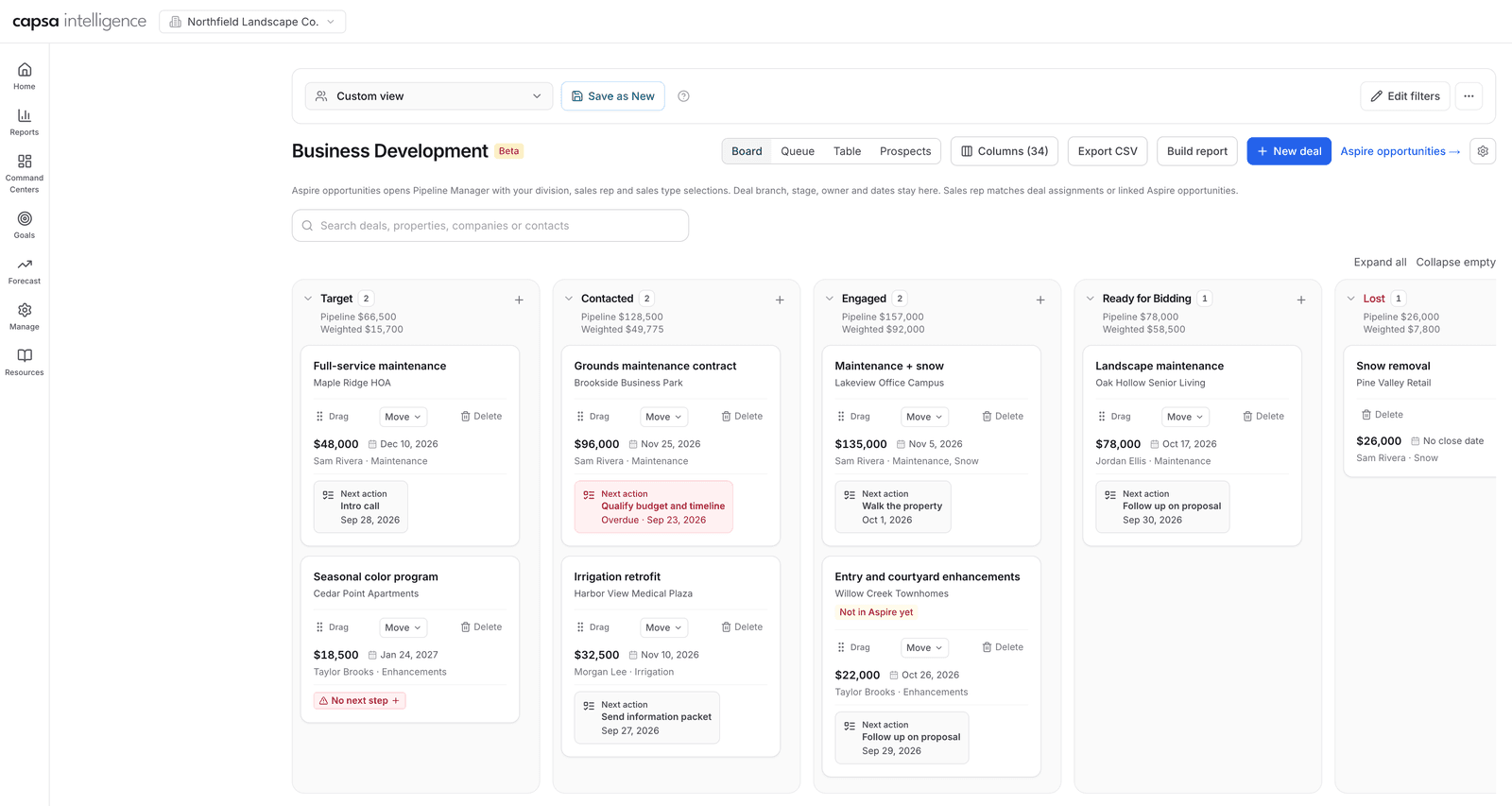
The board shows every open pursuit by stage, with pipeline and weighted value per lane and the next action on each deal.
What You'll Need
- Access to Business Development for everyone who owns or manages pursuits
- Your Aspire connection set up, with your Aspire administrator confirming Capsa's read and write access so deals can create and link Aspire records
- A leader with permission to change organization settings, to set up next-step templates and choose which sales types belong in Business Development
- Team agreement on what each stage means, so “Engaged” and “Ready for Bidding” carry the same weight for every rep
- Access to Pipeline Manager for anyone who will review the combined Capsa and Aspire pipeline report
The Three Modules
This playbook covers the full operating loop. Each module has its own step-by-step guide.
Create a deal
Capture a pursuit the moment it starts, even before the company or property is in Aspire.
Read the guideReport on the pipeline
See pipeline and weighted value by stage, build a table view, and compare it with your Aspire pipeline.
Read the guideMove a deal into Aspire
Hand a ready deal to your estimators and link the Aspire opportunity that carries it forward.
Read the guideSet Up Your Team's Starting Points
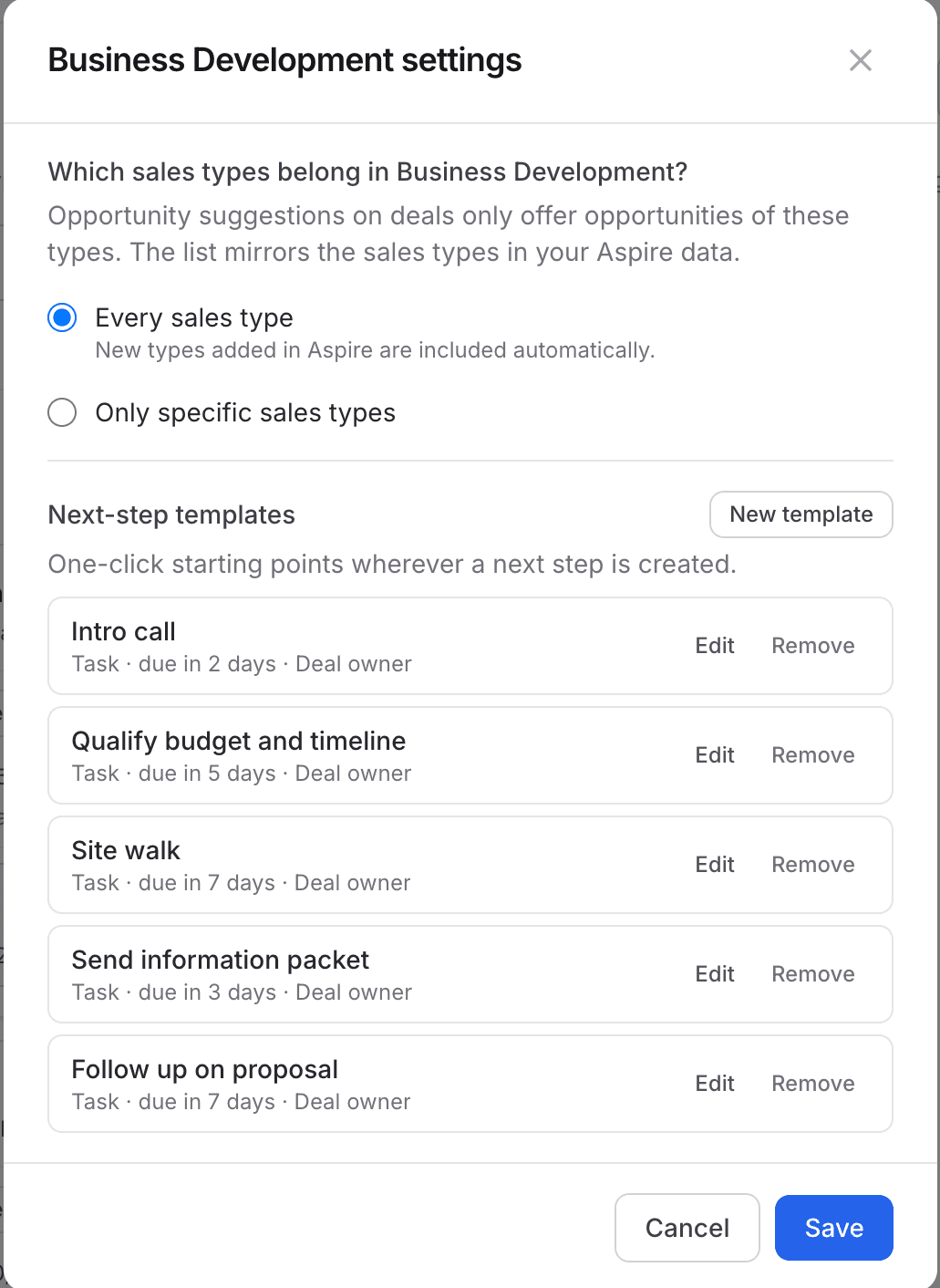
Before reps start logging deals, open Business Development settings from the gear on the Business Development page. Two choices shape how the team works:
Next-step templates
Templates are one-click starting points for the steps your team repeats: an intro call, qualifying budget and timeline, a site walk, sending an information packet, following up on a proposal. Each template sets the task, when it's due, and who it's assigned to—the deal owner, one person, or a choice each time.
Which sales types belong here
Choose every sales type, or only the ones your business development team pursues. Opportunity suggestions on deals only come from the sales types you include.
Capture Every Pursuit as a Deal
A deal only needs a name, an owner, and a stage. Add the company, contacts, and properties when you have them—Business Development lets you capture what you know today and connect it to Aspire later. Give the deal a value and probability so it counts in the pipeline from day one.
Step-by-step: Create a dealKeep Every Deal Moving From the Queue
A pursuit without a next step is a pursuit that's quietly dying. Switch to Queue to see every open deal sorted into bands that tell you where attention is needed:
Needs a next step
The deal, or one of its linked Aspire opportunities, has nothing planned. Add a step before anything else.
Overdue
A planned step is past its date. Do it, reschedule it, or decide the deal is lost.
Due today and due this week
Today's work and the next seven days, so reps can plan their calls and site walks.
Scheduled & waiting
Covered and current. Nothing to chase today.
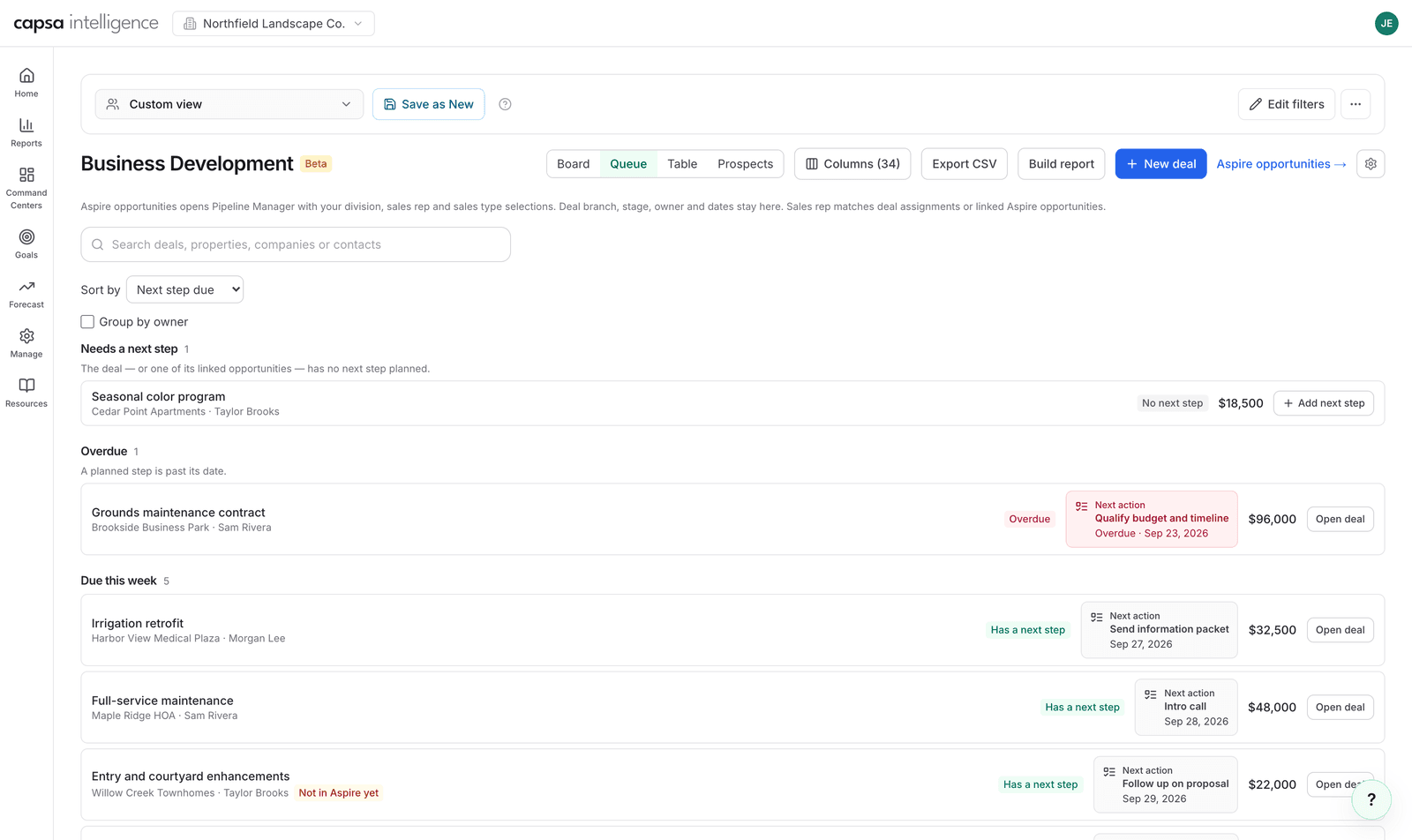
Use Group by owner in a team meeting to see which reps have deals needing action and which are all covered.
Review the Pipeline Every Week
Each lane shows its Pipeline total and its Weighted total—each deal's value multiplied by its probability. Use the table view and the combined pipeline report to review by owner, branch, division, or stage, and to see your pre-Aspire pursuits beside the opportunities already bidding in Aspire.
Step-by-step: Report on the pipelineHand Bid-Ready Deals Into Aspire
When a deal is ready for your estimators, move it to In Aspire Pipeline and link the Aspire opportunity that carries it forward. From then on, the deal's value is the total of its linked opportunities, and the pursuit history stays attached.
 Step-by-step: Move a deal into Aspire
 Best Practices
- Every deal has a next step. If a rep can't name the next step, the deal either needs one today or belongs in Lost.
- Log the pursuit before it's tidy. A deal with just a company name and a phone number is better than a pursuit that only lives in someone's head.
- Keep probability honest. Weighted value is only as good as the probabilities behind it. Agree on what each stage typically means for odds of winning.
- Mark lost deals lost. Record why it was lost. A clean pipeline is easier to trust, and the reasons show patterns worth acting on.
- Hand off with a link. Linking the Aspire opportunity keeps the deal's value accurate and connects the pursuit to the work it created.
Recommended Operating Rhythm
Daily
Each rep works the Queue: clear anything overdue, add a next step to any deal that needs one, and finish today's items.
Weekly
The sales leader reviews the board by stage and the Queue grouped by owner, moves stalled deals forward or to Lost, and hands bid-ready deals into Aspire.
Monthly
Review the combined pipeline report with leadership: pre-Aspire value by stage beside the Aspire opportunities those deals became.
Each season
Revisit your next-step templates and sales type choices so they match how the team is actually selling.